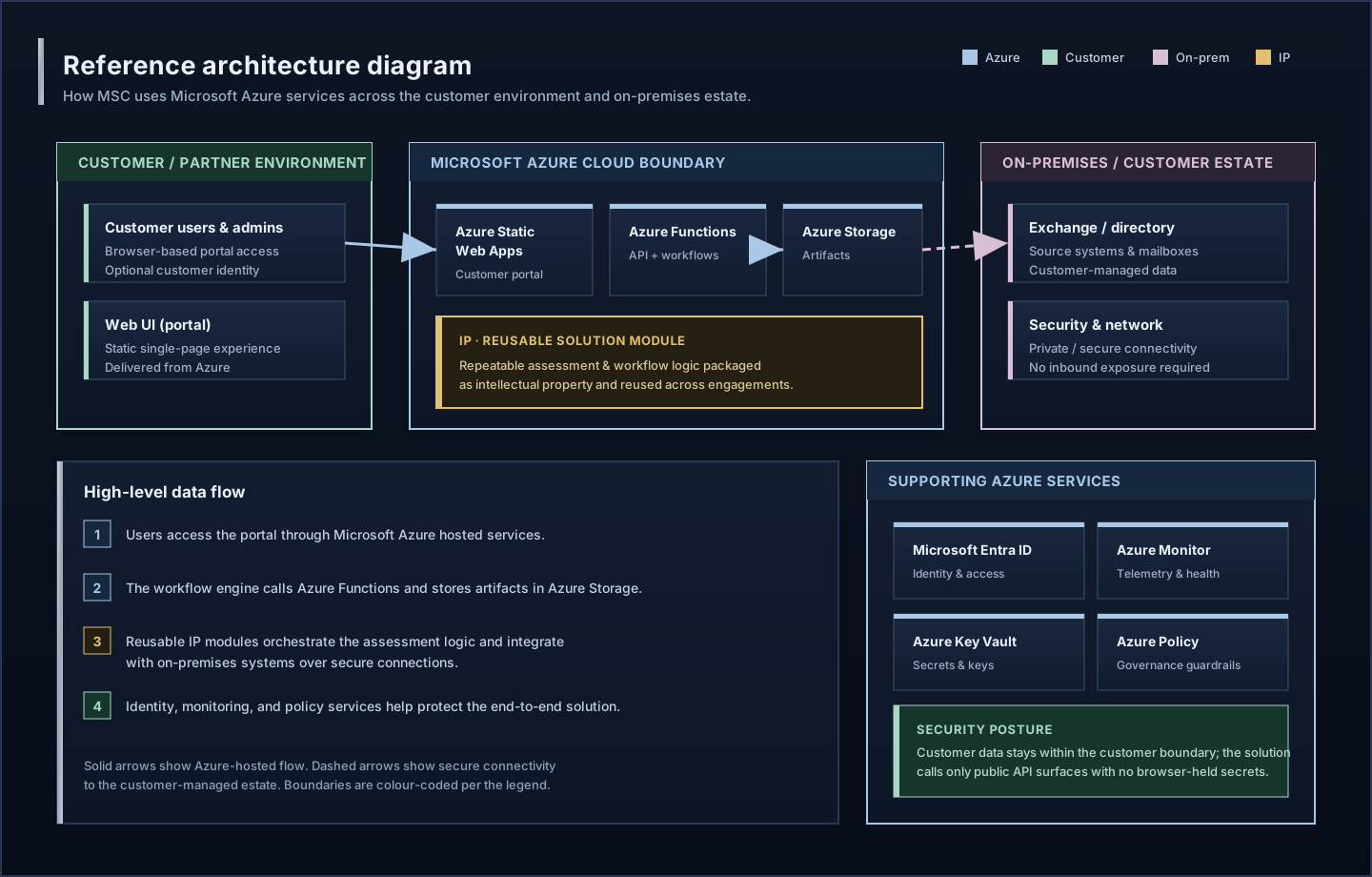
MSC On-Premises Edition (Build)

For air-gapped, regulated, or sovereignty-sensitive environments, MSC can be deployed as a self-contained virtual appliance on Azure Local (formerly Azure Stack HCI), Hyper-V, or VMware infrastructure.
Deployment fit
Sovereignty-first, offline-ready, and customer-controlled.
Security posture
No public exposure required. Internal DNS + HTTPS only.
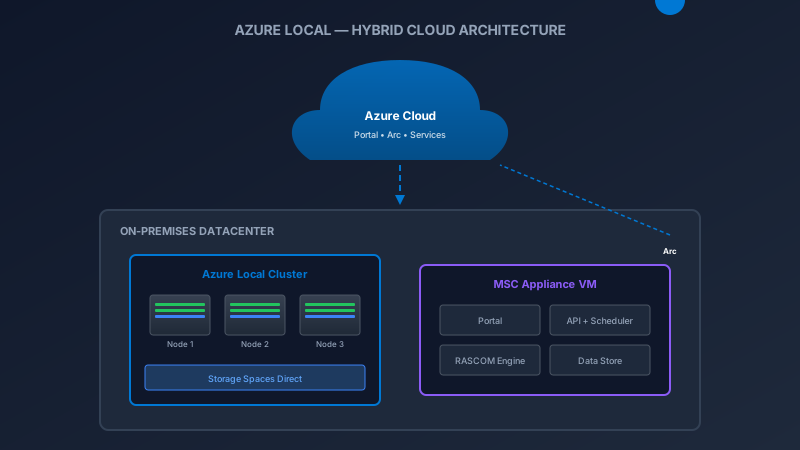
Azure Local — Microsoft's on-premises cloud platform
Azure Local solution overview showing hybrid cloud architecture
Learn more: Microsoft Learn — Azure Local overview
MSC Appliance Stack
◫Browser (User Access)
◈Reverse Proxy (TLS Termination)
⬡Portal (Next.js Static)
✦API (.NET 8 Worker)
◉Postgres (data + metadata)
◇Artifact store (evidence + exports)
∞Scheduler
◫RASCOM Engine (Module Execution + Optional Local AI)
🖥️Azure Local / Hyper-V / VMware Host
◈ Air-Gapped Ready
Operates fully offline. No internet required after initial deployment. Customer data never leaves the premises.
◫ Multi-User
Team members connect via browser to the same portal instance. Shared journeys, evidence, and artifacts.
∞ Server-Managed Scheduling
RASCOM cycling, maintenance, and artifact generation run automatically via a server scheduler (Hangfire or equivalent).
◫ Optional Local AI
Customer-owned AI management integration API. Optional Ollama/vLLM for local inference without cloud dependency.
How the Appliance Works
1Deploy the VM image to your Azure Local cluster, Hyper-V host, or VMware environment.
2Configure network settings (internal IP/DNS) and import your TLS certificate for HTTPS.
3Access the portal via browser. Team members authenticate via local accounts or optional AD/Entra integration.
4Run journeys — the scheduler executes RASCOM modules, collects evidence, and generates artifacts automatically.
5Export customer-safe deliverables (HTML, PDF, PPTX) for internal distribution — no cloud upload required.
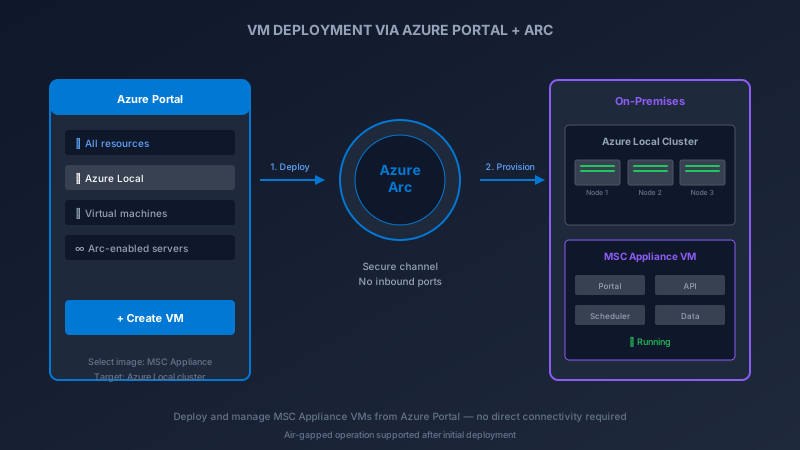
Azure Local — Deploy VMs with Azure Arc
Azure Local VM provisioning through Azure Arc
Learn more: Microsoft Learn — Azure Local VM management (Azure Arc)
Network Modes
◫ Connected Mode
Appliance can reach the internet for optional updates, cloud sync, and external Refresher knowledge. Outbound only — no inbound ports required.
◈ Air-Gapped Mode
Fully isolated. Updates delivered via USB/file transfer. All module content and AI models pre-loaded. Customer data never leaves the network boundary.
Comparison: Cloud vs On-Premises
FeatureCloud (SWA)On-Prem Appliance
DeploymentAzure Static Web AppsVM on Azure Local / Hyper-V / VMware
Internet RequiredYes (always)Optional (air-gap supported)
SchedulingAzure Functions timer triggersHangfire on local server
Data ResidencyAzure regionCustomer premises (full control)
Multi-UserVia Entra IDLocal accounts or AD/Entra
AI IntegrationAzure OpenAI / externalOptional local LLM (Ollama/vLLM)
Status: The On-Premises Edition is currently in active build (early access / preview).
2026 LuiT || ₷©®•Modern Support Consult•Hosted on Microsoft Azure + GitHub Enterprise
FAQPrivacyTermsAccessibilitySecuritySupportTRIX
Support details(version & routing)
APImsc-portal-api-d7g5fudfa7eufufa.westeurope-01.azurewebsites.net
Build6d394df1@20260501T180220Z
Billing & licensing(public summary)
This portal provides structured assessments and actionable guidance. Results depend on what is observable and what changes are implemented in your environment.
Results depend on inputs
  • Online scenarios measure available signals (for example: public DNS records) and report what is observable at the time of the run.
  • Guidance describes recommended steps; applying them may require configuration changes, permissions, vendor behavior, and timing.
  • Outcomes are influenced by multiple moving parts; we focus on measurable improvements, defensible choices, and clear evidence you can act on.
How costs are calculated (customer view)
  • Online run pricing: charged per paid online run. The price shown at checkout for the selected scenario is the source of truth.
  • Customization-supported scenarios: scope and pricing are confirmed with you (in writing) before work begins, and only change if scope assumptions materially change.
  • Performance-aligned pricing (larger scenarios): for eligible, explicitly agreed engagements, a portion of pricing can be aligned to measured outcomes. Where used, the percentage applied by MSC/LuiT is fixed (currently 3.69%) and is applied only after the model is understood, resonates, and is explicitly approved.
  • Billing cadence & crediting: billing can be issued monthly for the agreed delivery window, followed by a success reconciliation/credit once outcomes are verified against the agreed deliverables.
  • Taxes (such as VAT) may apply depending on your location and billing details. Invoice/checkout totals are the source of truth.
Fairness & exceptions
Reconciliation is based on the agreed deliverables and the available inputs. If customer-side deliverables (access, approvals, change windows) are delayed after being identified as blockers, we may pause measurement or re-baseline the delivery window. We prefer fast, transparent review and adjust when the facts support it.
License scope
Some scenarios and deeper artifacts are intentionally restricted in public mode. For customization-supported engagements, licensing/procurement and exact deliverables are confirmed before work begins. If you need enterprise-wide terms or invoicing, use Support.
Why Modern Support Consult
Microsoft-first, on-prem friendly
MSC is built around Microsoft infrastructure and cloud operations, with on-premises realities treated as first-class. Built by an Exchange-focused specialist (~30 years IT; ~20 years Microsoft messaging & integration).
Curated, regulated guidance
Not random tips: curated and cross-compared to reduce noise and keep actions defensible.
Benchmarking + checklist outputs
Scenarios benchmark posture and produce checklist-style remediation aligned with mainstream security/ops methods.
Quadral method (Codex / Metaflow-ready)
Evidence → traceable outcomes: signals, checks, decisions, guidance, exceptions. Designed for consistent benchmarking and audit-friendly reasoning.